Current Location: Blog >
Singapore VPS
1.
Overview: Objectives and overall architecture
- Goal: Run multiple TikTok accounts stably on the Singapore node, reducing bans and fingerprint risks.- Elements: Select the appropriate VPS, IP management, reverse proxy, container isolation, and traffic protection.
- Metrics: Target 99.9% availability, network latency <100ms, single-instance load <60%.
- Scope: Covers VPS configuration, IP pools, DNS and CDN, DDoS defense, and operations monitoring.
- Risk points: IP sharing, frequent requests, unisolated browsing environments, abnormal traffic detection.
- Results-oriented: Ensures long-term stable operation of multiple accounts and traceable logs through technical means.
2.
Singapore VPS selection and configuration example
- It is recommended to choose same-city (SG) or nearby regional nodes, prioritizing 1Gbps bandwidth ports.- Recommended configuration (example): 2 vCPU / 4GB RAM / 80GB NVMe / 1Gbps, suitable for 10-15 lightweight accounts.
- High-load example: 4 vCPU / 8GB RAM / 160GB NVMe / 1Gbps, suitable for concurrent processing of 30+ accounts.
- Provider references: Vultr SG, DigitalOcean SGP, Linode SIN, Tencent Cloud Singapore Node.
- Cost estimate: 2/4 configuration about $20-40/month, April 8 configuration about $60-120/month (depending on bandwidth and public IP count).
- The table below shows three sample configurations and their uses:
| The number | of accounts for the instanceCPU | , memory | , and disk | bandwidth | isaligned |
|---|---|---|---|---|---|
| Lightweight | 2 vCPU | 4 GB | 80 GB NVMe | 1 Gbps | 10-15 |
| Medium | 4-vCPU | 8 GB | 160 GB NVMe | 1 Gbps | 20-30 |
| High-availability | 8 vCPU | 16 GB | 320 GB NVMe | 2 Gbps | 50+ |
3.
IP and proxy management strategies
- Each TikTok account preferably uses an independent public IP or proxy to avoid frequent operations across multiple accounts using the same IP.- Recommendation ratio: 1 public IP is limited to 3-5 low-frequency accounts; High-frequency accounts are 1:1.
- Proxy pool: Use residential or ISP proxies, Singapore export IPs are prioritized, and rotation cycles can be set to 1-6 hours.
- Session Hold: Use reverse proxy (NGINX) + sticky session to maintain login status and avoid frequent fingerprint resets.
- IP detection and replacement: Monitoring response codes and behavioral anomalies (such as 429/403) triggers automatic IP switching and logging.
- Log compliance: records IP switching times, account IDs, and request volume (daily/per IP), facilitating traceability and optimization.
4.
Service deployment and containerization isolation
- Recommended operating system: Ubuntu 22.04 LTS or Debian 12, ensuring long-term secure updates.- Containerization: Use Docker+docker-compose to isolate each account or account group, limiting CPU and memory.
- Resource constraint example: container limit -- cpus=0.5 -- memory=512M (lightweight account), high-frequency accounts can be set to 1.0 CPU/1GB.
- Reverse proxy: NGINX serves as the entry point, handling TLS terminals, path routing, and rate limiting (limit_conn, limit_req).
- Scheduled tasks: Use cron + healthcheck scripts to periodically collect CPU, memory, network throughput, response delay, and threshold alarms.
- Backup strategy: daily increments, weekly full data, database and configuration stored offsite (e.g., S3 or Object Storage).
5.
Domain name, CDN, and certificate configuration
- Domain Strategy: Each group of accounts uses different subdomains (a1.example.com, a2.example.com) to avoid using the same domain name entirely.- DNS settings: A record points to a reverse proxy IP, TTL is recommended for 300 seconds for quick switching.
- CDN purpose: Only for static resources and image caching, avoiding routing dynamic API traffic through third-party CDNs to avoid fingerprint confusion.
- SSL certificate: Automatically issued with Let's Encrypt and automatically renewed in container/NGINX.
- CNAME and Streaming: Using CNAME to CDN for high-traffic static resources accelerates and reduces source station pressure.
- Example TTL and cache: DNS TTL=300s, static resource Cache-Control=public, max-age=86400.
6.
DDoS protection and network security
- Basic protection: Enable network ACL and DDoS protection from VPS providers (on-demand and charged by traffic).- Local firewall: Use ufw/iptables to limit ports, only opening necessary ports (22/443/80), and manage ports bound to the internal network or VPN.
- Burst traffic handling: Bandwidth peak example—threshold 1Gbps, switches to cleaning nodes or upstream Anycast when abnormal traffic occurs.
- Login protection: Install fail2ban to limit SSH/HTTP brute force; password + key dual authentication is recommended.
- Logs and alerts: Integrate Prometheus+Grafana or external monitoring (Datadog) and set traffic/error rate alarm thresholds (e.g., error rate within 5 minutes>5%).
- Recovery Drills: Regularly simulate failures (single node disconnection, IP blocking) and verify backup and switching strategies.
7.
Real Case: Practical data from a marketing team
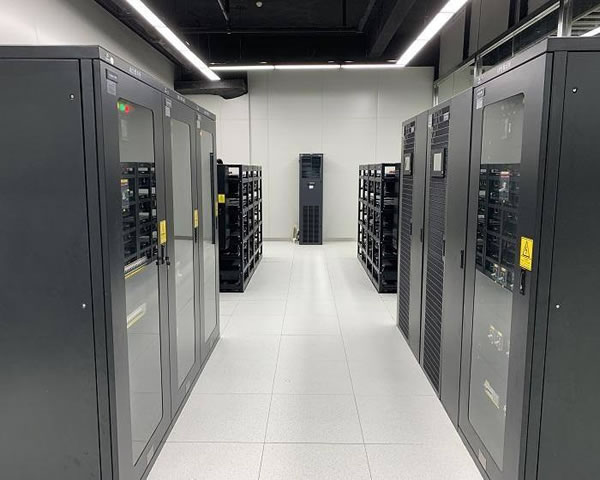
- Background: An SG marketing team operates 20 TikTok accounts, requiring stable placement and content uploads.- Deployment: 4 VPSs, configured as follows: two medium-sized (4vCPU/8GB) as business nodes, and two lightweight (2vCPU/4GB) as auxiliary/agent.
- IP policy: Each VPS is bound to 4 independent public IPs and paired with 20 containers (each container bound to an independent proxy or different ports).
- Running data: Over 30 days, average CPU usage is 35%, daily uplink bandwidth peak is 120 Mbps, and overall availability is 99.95%.
- Issues and Optimization: Initially, there were three temporary IP bans; after switching to residential proxies and increasing daily IP rotation, the ban rate dropped by 90%.
- Results: Through container isolation + IP pools + monitoring alerts, account stability was significantly improved, and manual operation and maintenance man-hours dropped by about 40%.
8.
Summary and practical suggestions
- Start with small-scale validation (for example, 10 accounts per mid-sized VPS), monitor before scaling horizontally.- Enhanced IP management and session isolation to prevent multiple accounts from frequently sharing the same IP.
- Containerized deployment, resource capping, and automated monitoring are the core of stable operation.
- Make proper use of CDN and domain name policies; set SSL and DNS TTL as agile switching plans.
- Enterprise-level needs Consider purchasing Anycast or hosting services with DDoS cleaning to ensure long-term stability.
- Continuously record and retrospectively record real logs, adjusting frequency, concurrency, and IP strategies based on data to reduce risk.
- Latest articles
- How To Save Money On Singapore VPS Vouchers Through Events And Promotions
- In Marketing And Data Scraping Scenarios, What Is The Most Appropriate Analysis Of Korean Native IP Proxies?
- Procurement References Korean Server Names, Quickly Filtering Brands From Supplier Catalogs
- Technical Implementation Detailed Steps For Binding And Routing Taiwan's Native Static Residential IPs
- Vietnam VPS Independent Server Long-term Maintenance Costs And Recommended Automated Operation And Maintenance Tools
- Optimization Suggestion: Storage Archiving And Resource Management Solution Under US VPS For Unlimited Content
- How To Purchase Gouyun Servers In Vietnam And Complete The Fast Launch Process
- How Is Japan's CN2 From An Operations And Maintenance Perspective? Recommendations For Handling Node And Routing Faults
- Hong Kong Cheap VPS Speed Review: Actual Bandwidth Peak And Stability Report
- Key Points Regarding Security Qualifications And Contract Terms For Companies That Can Choose Taiwanese Cloud Servers
- Popular tags
Best Practices
VPS Usage Effectiveness
Big Brother Cloud
Third-party Quotation Tool
Minecraft Server
Sst
Delay
High-quality Vps
Comparative Analysis
Lightweight Server
Other Countries Vps
Guide Selection
Imported Servers
Peak Traffic
Localization Acceleration
Migration Path
Cn2vps Purchase
Dual Isp Service
Data Center
Cost Optimization
Compliance Process
Network Operation And Maintenance
Bbr
Hard Drive
VPS Selection
Penang
VPS Evaluation
Vps Test
Cn2 Services
Related Articles
-

A Cost Optimization Perspective On Bandwidth Billing And Traffic Control For Connecting To Cloud Servers In Singapore
from the perspective of cost optimization, it analyzes the common <b>bandwidth billing</b> models and <b>traffic control</b> strategies when connecting to cloud servers in singapore, and provides executable steps, calculation examples and risk tips to help enterprises reduce network expenses and improve reliability. -

Singapore Cmi Vps Control Panel Operation Tutorial And Common Function Configuration Guide
detailed singapore cmi vps control panel operation tutorial, including step-by-step practical guides for logging in, creating instances, network firewalls, ssh configuration, snapshot backup, system reinstallation and common maintenance operations, with faqs. -
Real-time Updated Source Of Singapore Vps Vouchers During Holidays And Promotional Seasons
compiled common singapore vps vouchers during holidays and promotional seasons and their sources of real-time updates, including official channels, communities, price comparison sites and automated monitoring methods, and recommended dexun telecommunications as the preferred supplier.